
Freeze a rotation
A freeze stops a rotation’s handovers from a start to an end: for a holiday week, or a change freeze. The schedule does not change. Every handover inside the freeze is dropped, and the first handover after it is the next regular one.
You need: permission to edit the rotation. The rotation must be enabled, and not linked to PagerDuty or Jira Service Management. A freeze works on every plan.
What a freeze does
Section titled “What a freeze does”A handover that falls inside the freeze does not happen. It is not moved to the end of the freeze, and it is not made up later. The rotation picks up at its next regular handover, which goes to the next person in order, as if the dropped handovers had never been due.
That means whoever is on duty when the freeze starts can hold the turn for longer than usual. Take a rotation that hands over every Monday at 09:00, with Alex on duty since Mon 14 Dec, frozen from Sat 19 Dec to Sun 3 Jan:
- The handovers on Mon 21 Dec and Mon 28 Dec are dropped.
- The next handover is Mon 4 Jan, 09:00, to the person after Alex on the list.
- With Keep on duty, Alex is on duty until Mon 4 Jan, 09:00: three weeks in all.
To skip weekends or public holidays every year, use the schedule’s skip options instead: see Skipping weekends and holidays. A skipped day moves its handover to the next working day. A freeze drops it.
Choose who is on duty during the freeze
Section titled “Choose who is on duty during the freeze”| Option | During the freeze | When it ends |
|---|---|---|
| Keep on duty | Whoever is on duty stays on duty. Coverage hours open and close as usual. | The next regular handover goes ahead as planned. |
| Nobody on duty | Everybody goes off duty at the start, in every window, including windows open all week and Manual ones. | The same people come back on duty, and hold until the next regular handover. |
With Nobody on duty, the people who come back are the people who were on duty when the freeze started, however many handovers it dropped. In the example above, Alex is back on Sun 3 Jan and on duty until Mon 4 Jan, 09:00.
Somebody does not always come back at the very end:
| At the end of the freeze | What happens |
|---|---|
| The window is shut | The same person comes back when it next opens. |
| The person is away, through an unavailability, Out this turn or a Slack status | A stand-in takes the turn, chosen as for any absence: see Who stands in for a short absence. |
| The person has left the rotation | The next person on the list takes the turn. |
| Nobody on the list is free | Nobody is on duty in that lane until somebody is free, and the usual warning when nobody can go on duty is sent. |
On a rotation you rotate by hand (the Manual schedule), Keep on duty is greyed out and reads No handovers on a manual rotation. There are no handovers to drop, so only Nobody on duty changes anything.
Freeze a rotation
Section titled “Freeze a rotation”- Open the rotation page in the dashboard, click … in the page header and choose Freeze rotation.
- Under Start, choose Now, or From a date and set Start date and From.
- Under End, set End date and Until. Times are in the time zone named under them, the one chosen in the top bar.
- Under On duty during the freeze, choose Keep on duty or Nobody on duty. The line under each names who it affects, as in Alex Rivera on duty throughout or Alex Rivera back on duty at the end.
- Check Next turns: who is on duty, and from when, with the freeze applied. Under it, Dropped handovers lists the handovers the freeze drops, or reads No handovers dropped.
- Select Freeze rotation.
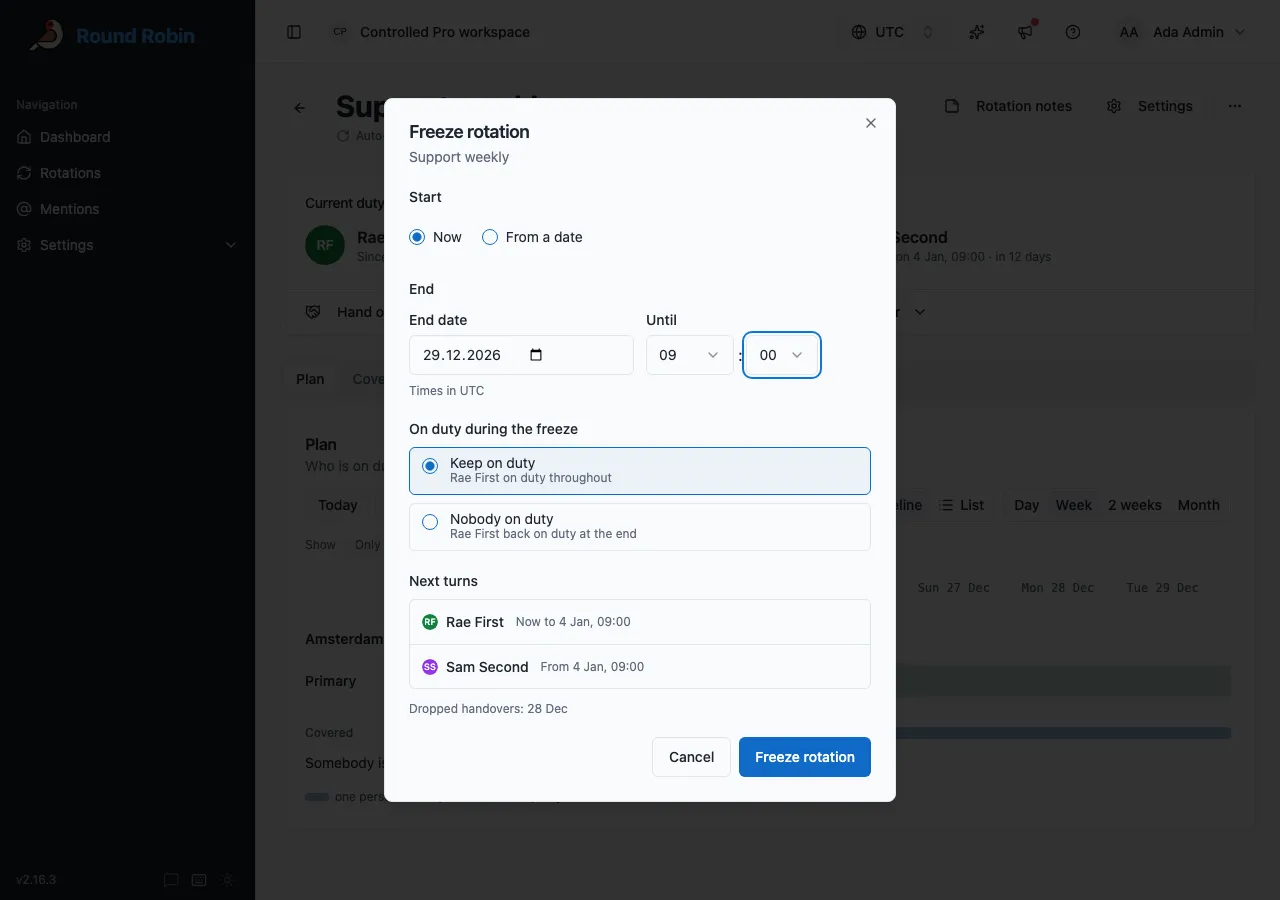
The lines under the two options name up to two people. With more on duty, they read The people on duty stay throughout and The people on duty come back at the end.
On a rotation with more than one lane or window, Next turns has a group for each, headed by its lane, as in Primary. With more than one window, the heading adds the window: Primary · Berlin.
With Nobody on duty selected, Next turns starts with a Nobody on duty row for the freeze itself, then the same person returning, tagged Back on duty:
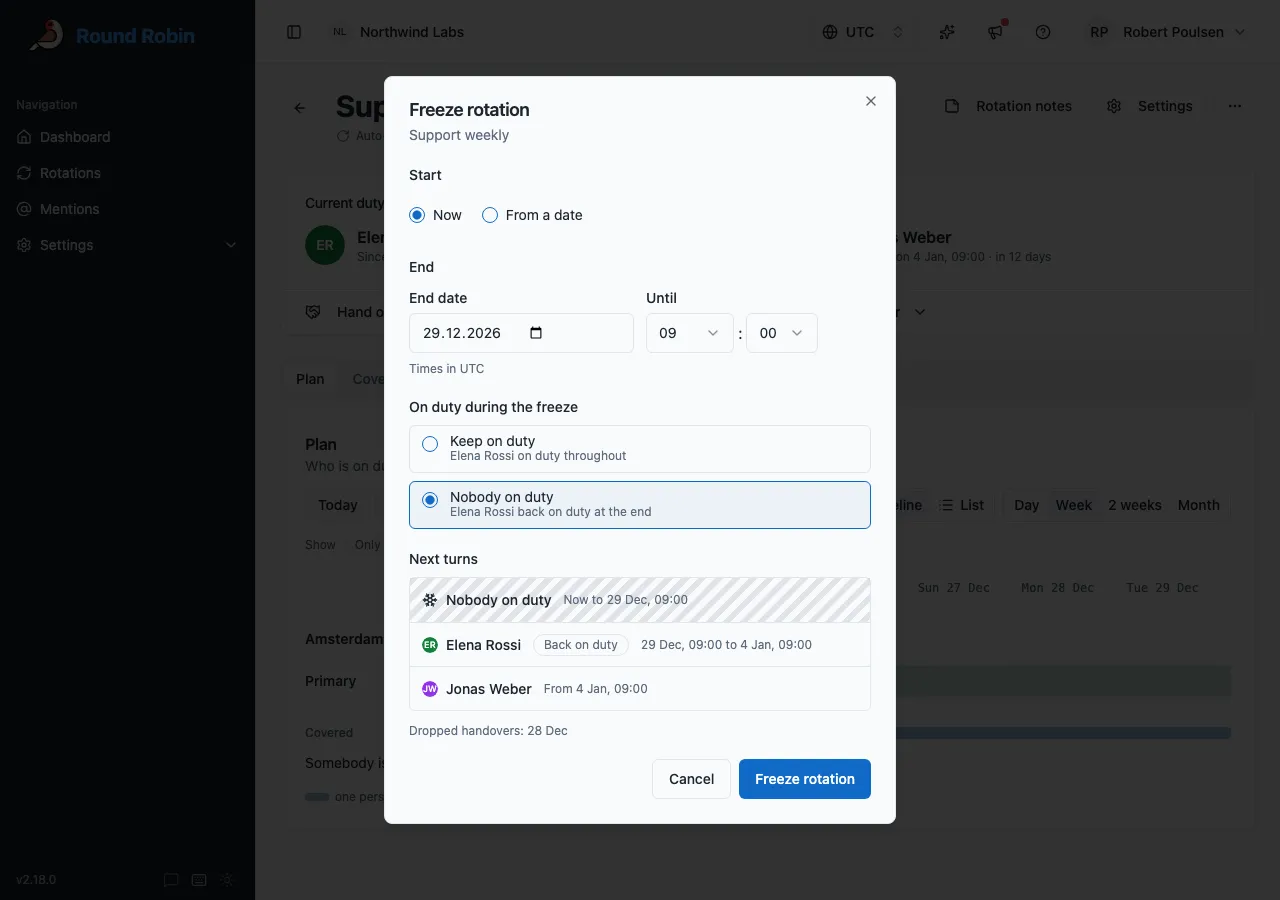
A freeze that starts now shows Rotation frozen. One that starts later shows Freeze scheduled.
A rotation has one freeze at a time. It lasts at most 365 days, and its end must come after its start.
See a frozen rotation
Section titled “See a frozen rotation”A banner under the rotation’s header names the freeze, its option and the handovers it drops. It reads Frozen until day and time while the freeze runs, and Freeze from day and time to day and time before it starts.
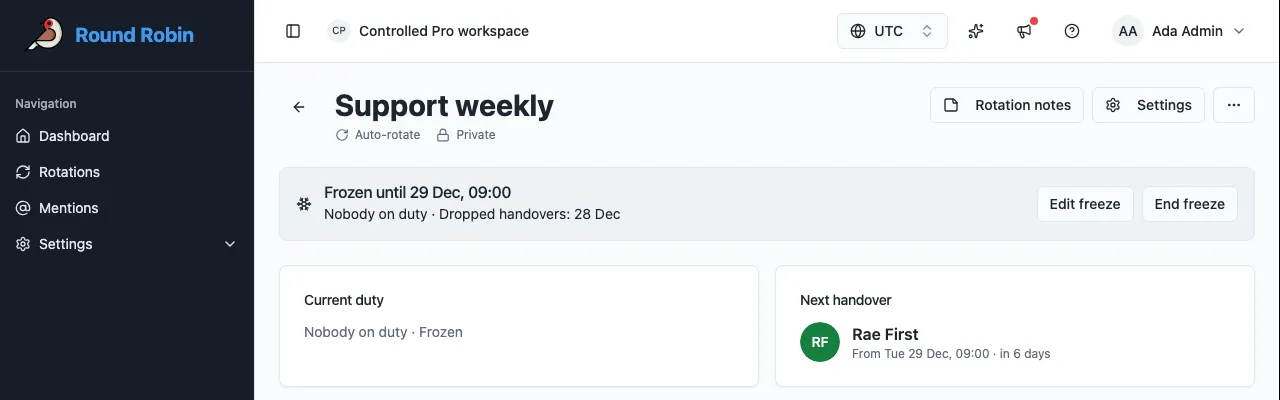
Elsewhere in the dashboard:
- Rotations tags the rotation Frozen until day, or Freeze from day before it starts.
- Plan shades the freeze, labelled Frozen, or Nobody on duty · Frozen. A dashed line marks each Dropped handover. The list view adds a Frozen start to end line.
- With Nobody on duty, Current duty reads Nobody on duty · Frozen, and Next handover names who comes back, and when. Coverage marks each window Frozen.
In Slack, the rotation leads with the freeze, as in “❄️ Frozen until Nov 26 at 15:00. Nobody is on duty.”, and drops the lines about how it normally runs: see A frozen rotation in Slack.
Change or end a freeze
Section titled “Change or end a freeze”What you can change depends on whether the freeze has started.
| The freeze | Edit freeze | The other button |
|---|---|---|
| Has not started | Change the start, the end and the option. Select Save. | Remove freeze, then Remove freeze in Remove freeze?. Nobody is told. |
| Is running | Change the end only, later or sooner. It must stay in the future. Select Save. | End freeze, then End freeze in End freeze now?. |
Edit freeze and End freeze now? show Next turns before you confirm.
End freeze ends it now, exactly as if it had been set to end now. The handovers it was still going to drop come back, and the next regular handover follows. With Nobody on duty, the people it took off duty come back now, or when their window next opens.
To change the option on a running freeze, end it and freeze the rotation again.
What works while a rotation is frozen
Section titled “What works while a rotation is frozen”Keep on duty
Section titled “Keep on duty”Rotate now, Out this turn and Hand over all work. A turn changed by hand during the freeze lasts until the first regular handover after the freeze.
You can still edit the rotation’s schedule and coverage hours. The freeze keeps dropping every handover in its range, on the new schedule too. Somebody who leaves the rotation while on duty is replaced at once.
Nobody on duty
Section titled “Nobody on duty”Nobody can be put on duty until the freeze ends. Current duty and Next handover have no actions, and Coverage has no rotate or put-on-duty buttons. Rotate in Slack, and rotating or setting who is on duty through the API, are refused. To put somebody on duty, end the freeze first.
A cover request or a swap that touches the freeze is refused, including one that was already waiting when the freeze started. In Plan and My shifts, the Hand over options on a turn inside the freeze read Nobody is on duty while the rotation is frozen: choose End freeze first. In Slack, Accept on such a request replies Nobody is on duty while the rotation is frozen. End the freeze first. Requests for turns after the freeze work as usual.
You can still edit the schedule and coverage hours. An unavailability still counts: whoever is away when the freeze ends is replaced by a stand-in.
Disabling, uninstalling and partner schedules
Section titled “Disabling, uninstalling and partner schedules”Disabling the rotation removes its freeze. Enabling it again starts with no freeze: see Switch a rotation off. Uninstalling Round Robin from Slack removes every freeze, and reinstalling does not bring them back. Linking the rotation to PagerDuty or Jira Service Management removes the freeze too.
A rotation linked to a partner schedule cannot be frozen. Freeze rotation is greyed out in the … menu, with the reason under it, such as The PagerDuty schedule decides who is on duty.
What people are told
Section titled “What people are told”| When | Keep on duty | Nobody on duty |
|---|---|---|
| The freeze starts | The rotation’s channels hear that it is frozen until the end, who is on duty until when, and which handovers are dropped. Each person whose turn gets longer gets a direct message. | The rotation’s channels hear that it is frozen and nobody is on duty, and who returns when. Each person taken off duty gets a direct message saying when they are back. |
| The freeze ends, or is ended early | The channels hear Freeze ended, with who is on duty until when. A freeze ended early also tells each person whose turn got shorter. | The people coming back go on duty with the usual on-duty messages. |
| A freeze that has not started is removed | Nothing | Nothing |
With Nobody on duty, the channel topic reads “Round Robin says: nobody is on duty for rotation name. Frozen until Tue 09:00 (Europe/Rome).” The reply to a mention that finds nobody on duty says Frozen until day and time.
For the exact messages, who gets each one and the switches that control them, see Freeze.
History and Activity
Section titled “History and Activity”With Nobody on duty, a turn the freeze ends is badged Rotation frozen in the rotation’s History. While the freeze runs, each lane it took off duty has a running row labelled Frozen, nobody on duty, one per window. The day summary counts that time as frozen, not as a gap. When the freeze ends, the row is badged Freeze ended. See A frozen rotation in History.
Keep on duty changes nobody’s turn, so it adds no History row. The running turn of the person on duty is tagged Frozen. The rotation’s Activity records every freeze either way: Frozen and Freeze changed, each with its option, and Freeze ended. See See who changed what.
Freeze through the API
Section titled “Freeze through the API”| Task | Endpoint |
|---|---|
| Freeze a rotation, or change its freeze | PUT /v1/rotations/{rotationId}/freeze |
| End a freeze now, or remove one that has not started | DELETE /v1/rotations/{rotationId}/freeze |
| See what a freeze would do, without setting it | POST /v1/rotations/{rotationId}/freeze/preview |
All three need a team API key with write:rotation. PUT and DELETE need If-Match: see Conditional writes. A DELETE on a rotation with no freeze is not an error.
PUT and the preview take the same body. Leave out startsUtc to start now. mode is keepOnDuty or nobodyOnDuty.
{ "startsUtc": "2026-12-19T00:00:00Z", "endsUtc": "2027-01-03T00:00:00Z", "mode": "nobodyOnDuty"}The preview answers with the handovers the freeze drops and, for each lane, who holds it now and when its next regular handover comes. A rotation read through the API carries freeze while one is set. While a Nobody on duty freeze runs, nobodyOnCallReason on GET /v1/rotations/{rotationId}/on-call reads nobody-on-call-as-arranged, and rotating or setting who is on duty answers 409 with rotation_frozen_nobody_on_duty.
Fields and responses are in the API reference. Refusal codes are in Errors.
When a freeze is refused
Section titled “When a freeze is refused”| What you see | What it means | What to do |
|---|---|---|
| Could not rotate: Nobody is on duty while the rotation is frozen: choose End freeze first | A Nobody on duty freeze is running. | Select End freeze on the banner, then rotate. |
| In Slack: Nobody is on duty while the rotation is frozen. End the freeze first. | The same, from Rotate on an older message or card. | End the freeze in the dashboard. |
| Hand over options on a turn read Nobody is on duty while the rotation is frozen: choose End freeze first | The turn falls inside a Nobody on duty freeze. | Choose a turn after the freeze, or select End freeze on the banner first. |
| In Slack, Accept on a cover or swap request replies Nobody is on duty while the rotation is frozen. End the freeze first. | The request touches a running Nobody on duty freeze. | Answer it after the freeze ends, or end the freeze in the dashboard first. |
| Freeze end in the past: choose a later end, or End freeze | The end you chose has passed. | Choose a later end. To stop a running freeze now, use End freeze. |
| Freeze start in the past: choose Now or a later start | The start you chose has passed. | Choose Now, or a later start. |
| Freeze end not after its start: choose a later end | The end is at or before the start. | Choose a later end. |
| Freeze longer than 365 days: choose an earlier end | A freeze lasts at most 365 days. | Choose an earlier end. |
| Running freeze: only its end can change | Once a freeze has started, its start and its option are fixed. | Change only the end. To change the option, select End freeze and freeze the rotation again. |
| Freeze rotation is not in the … menu | The rotation is disabled, it already has a freeze, or you cannot edit it. | Enable the rotation, use Edit freeze on the banner, or ask an owner or a workspace admin. |
Next steps
Section titled “Next steps”- Out this turn: give the rest of one turn to a stand-in.
- Out-of-office and availability: mark one person away without stopping the rotation.
- Switch a rotation off: stop a rotation until you switch it back on.