Templating tokens
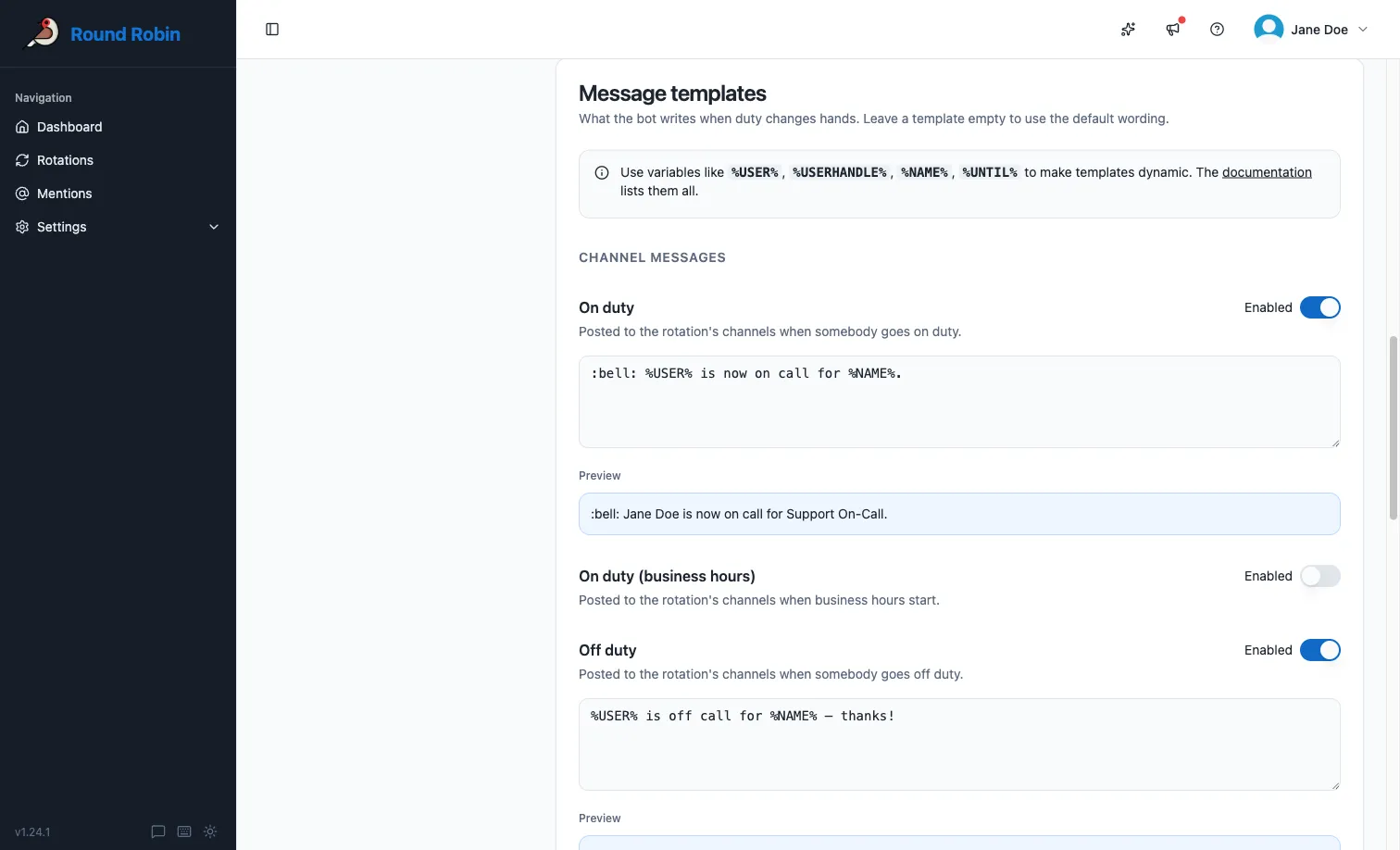
Wherever Round Robin lets you write a custom text (duty messages or channel topics, for example), you can insert replacement tokens. Round Robin replaces each token with live rotation data when it sends the message or updates the topic.
Where to write templates
Section titled “Where to write templates”Templates are edited in the web dashboard:
- Open app.roundrobinbot.eu and select your rotation.
- Click Settings and open Messages & Slack: the Message templates card customizes duty messages, the Channel topic card customizes the topic.
- Type your template using the tokens below, check the live preview under the text box, and save.
See Message management and Topic management for the full details of each page.
Token rules
Section titled “Token rules”A few rules apply everywhere:
- Where Slack markdown is supported, you can format your text freely. See the Slack formatting guidelines. Slack markdown does not work in channel topics.
- Where Slack markdown is not supported (again: topics), use the
TEXTONLYvariant of a token where available. It renders the handle as plain text instead of a clickable mention. - To write a multiline message, press Return and keep typing. Do not type a literal
\n. - If a token has no value in the current context, Round Robin replaces it with
N/A.
Rotation properties
Section titled “Rotation properties”| Token | Description |
|---|---|
%NAME% |
The rotation name (for example “Standup”). |
%DESCRIPTION% |
The rotation description, if set. |
%DUTY_SIZE% |
The number of people on duty at the same time (usually 1). |
%ROTATION_NOTES% |
The rotation notes. Replaced with empty text if there are no notes. |
Users on duty
Section titled “Users on duty”| Token | Description |
|---|---|
%USER% |
The real name of the user on duty (for example “Robert Redford”). |
%USERHANDLE% |
The handle of the user on duty (for example “@robert”) as a clickable Slack mention. |
%USERHANDLE_TEXTONLY% |
The handle of the user on duty as plain text. |
%USERID% |
The Slack ID of the user on duty. |
Multi-user rotations and numbered tokens
Section titled “Multi-user rotations and numbered tokens”If more than one user is on duty, the tokens above expand to the whole group: %USER% becomes “A and B”.
To target a single user, append their position (1-based) to the token name. For example, with users A and B on duty, %USER1% produces “A”. If the position exceeds the number of users on duty, the token produces N/A.
Numbered forms work for all the on-duty and next-on-duty user tokens, for example %USERHANDLE1%, %USERID2%, or %NEXT_USERHANDLE_TEXTONLY3%.
Users next on duty
Section titled “Users next on duty”| Token | Description |
|---|---|
%NEXT_USER% |
The real name of the user who will be on duty after the current one. |
%NEXT_USERHANDLE% |
The handle of the next user on duty as a clickable Slack mention. |
%NEXT_USERHANDLE_TEXTONLY% |
The handle of the next user on duty as plain text. |
%NEXT_USERID% |
The Slack ID of the next user on duty. |
Rotation events
Section titled “Rotation events”| Token | Description |
|---|---|
%UNTIL% |
When the current duty ends, in the rotation’s local time (for example “Monday, 24 April 2023 14:00:00”). |
%UNTIL_UTC% |
When the current duty ends, in UTC (for example “Mon, 24 Apr 2023 12:00:00 GMT”). |
%NEXT_UNTIL% |
When the next duty ends, in the rotation’s local time. |
%NEXT_UNTIL_UTC% |
When the next duty ends, in UTC. |
%TIMEZONE% |
The rotation schedule’s timezone identifier (for example “Europe/Amsterdam”; see the tz database list). |
%TZ_OFFSET% |
The rotation schedule’s base offset from UTC, not counting daylight saving time (for example “+01:00” for Europe/Amsterdam). |
On-duty group
Section titled “On-duty group”| Token | Description |
|---|---|
%DUTYHANDLE% |
If the rotation uses an on-duty user group, the group’s handle (for example “@standup-operator”) as a clickable Slack mention. |
%DUTYHANDLE_TEXTONLY% |
If the rotation uses an on-duty user group, the group’s handle as plain text. |
Acting user
Section titled “Acting user”These tokens refer to the person performing a manual action, so they only have a value during manual actions. For example, if you (user Y) manually set user X on duty, the ME tokens point to you, not to user X.
| Token | Description |
|---|---|
%ME% |
The real name of the acting user. |
%MY_HANDLE% |
The handle of the acting user as a clickable Slack mention. |
%MY_HANDLE_TEXTONLY% |
The handle of the acting user as plain text. |
%MY_ID% |
The Slack ID of the acting user. |
Next steps
Section titled “Next steps”- Customize rotation messages: where you put these tokens to work.
- Topic management: the same tokens in channel topics.
- Round Robin in Slack: where the replaced tokens end up.